


- Blog
- Geo Scheduling
- Map Scheduler vs. Route Planner: What’s the Difference?
When your team spends its day on the road, location matters. Whether you’re managing technicians, sales reps, inspectors, or service teams, every appointment impacts travel time, workload, and customer satisfaction.
A map scheduler and a route planner are two of the most powerful tools available for managing field operations. While they often work together, they solve very different problems. A map scheduler determines who should go where and when, while a route planner determines the most efficient way to get there.
If you’re evaluating map-based scheduling software, route optimization tools, or geographic workforce management solutions, understanding the difference is critical. In this guide, we’ll explain how each tool works, when to use them, and why modern organizations are increasingly combining both capabilities into a single location-intelligent workflow.
What Is a Map Scheduler?
A map scheduler is a scheduling tool that uses geographic data to recommend the best appointments, technicians, routes, and schedules. Instead of simply finding open time slots, map-based scheduling considers travel time, appointment windows, employee availability, territory assignments, and workload distribution.
Traditional scheduling tools focus on calendars. A scheduling map combines calendars with geographic intelligence, helping teams make smarter decisions before work is assigned.
For field service teams, outside sales organizations, inspectors, healthcare providers, and delivery operations, this means serving more customers while reducing unnecessary travel.
Map-based scheduling helps organizations:
- Assign the best employee to each appointment
- Reduce drive time between visits
- Balance workloads across teams
- Prevent scheduling conflicts
- Improve customer response times
- Increase daily appointment capacity
Unlike traditional scheduling software, intelligent scheduling uses location data as a core part of the decision-making process.
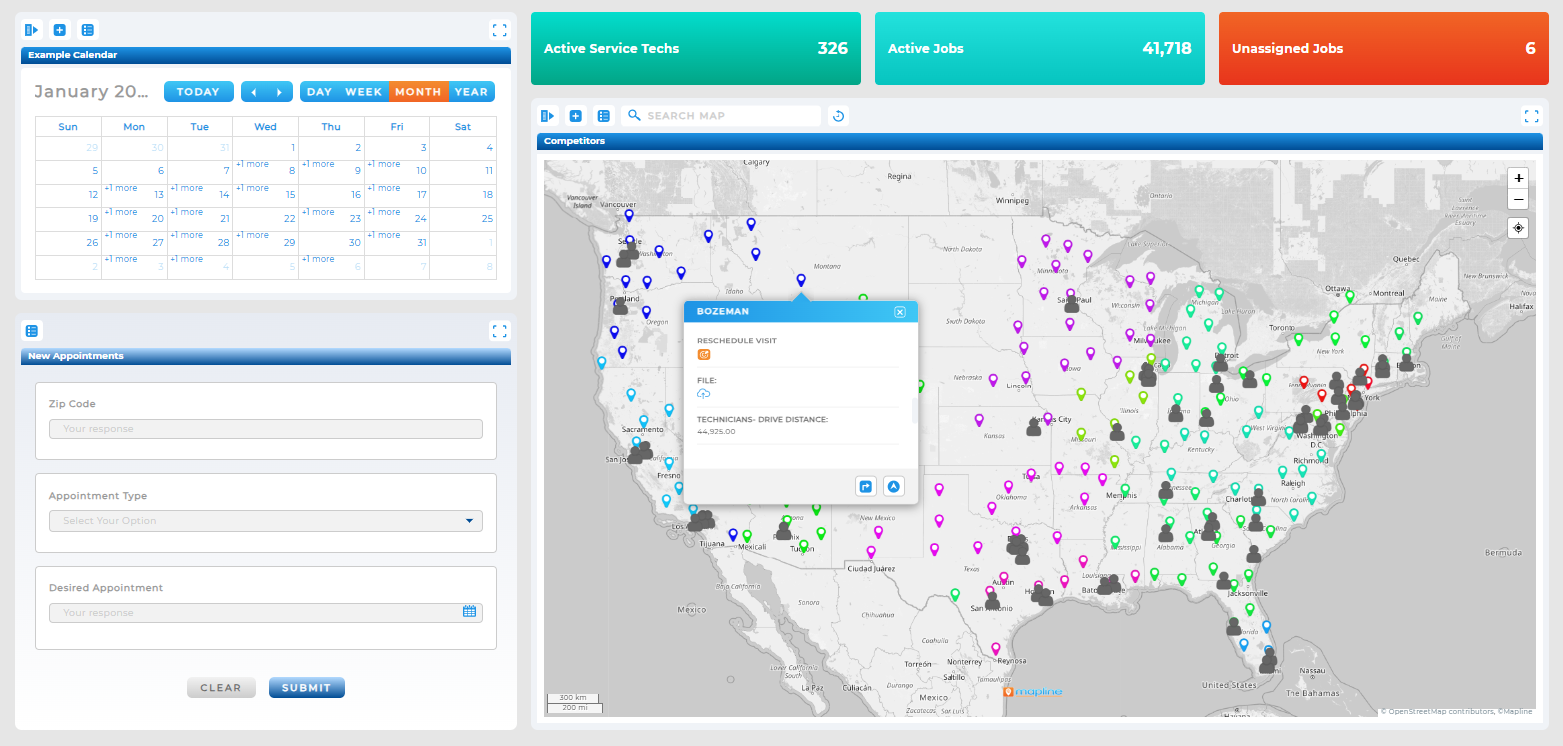
Key Capabilities of Map-Based Scheduling:
- Live visibility of employee location and availability
- Automatic schedule recommendations based on geography
- Smart filters for skills, certifications, and job types
- Real-time workload balancing
- One-click rescheduling and rerouting
- Territory-aware appointment assignment
Pro Tip: Mapline isn’t just a route planner or a scheduler—it’s both, built into one smart, intuitive platform. Schedule appointments, reroute drivers, and optimize your team in real-time. No add-ons. No workarounds. Just one tool that thinks like your business does.
What Is a Route Planner?
A route planner, on the other hand, on optimizing travel. Once appointments or stops have been assigned, route planning software determines the most efficient sequence for completing them.
Whether you’re using a trip planner, route creator, route maker, map route planner, or sales route planner, the goal is the same: reduce mileage, lower costs, and maximize productivity.
Route planners are especially valuable for:
- Delivery companies
- Field service teams
- Outside sales organizations
- Inspectors
- Mobile healthcare providers
- Logistics operations
Rather than deciding who should perform a job, route planners focus on helping workers complete their assigned work as efficiently as possible.
Key Capabilities of Route Planning Software:
- Multi-stop route optimization
- Distance and drive-time reduction
- Multi-driver route balancing
- Time window management
- Mobile navigation
- Route reporting and analytics
Map Scheduler vs. Route Planner: Key Differences
While both tools use maps and location data, they solve different operational challenges.
The most advanced platforms combine both capabilities, allowing organizations to optimize schedules and routes simultaneously.
| Feature | Map Scheduler | Route Planner |
|---|---|---|
| Primary Use | Scheduling jobs based on location, workload, and availability | Optimizing stop order for a given route |
| Live Re-Optimization | Yes—schedule updates dynamically | Yes—but focused on routes, not appointments |
| Use Cases | Dispatchers, field service, on-demand scheduling | Deliveries, outbound sales, route planning |
Mapline does both. We invented Geo Scheduling and built it on the same foundation as our proprietary routing engine, meaning you can go from lead to route in seconds, without bouncing between tools.
Shared Capabilities: Why Modern Teams Need Both
As organizations grow, scheduling and routing become increasingly connected. Assigning appointments without considering travel creates inefficiencies. Optimizing routes without considering workload, skills, or availability creates bottlenecks.
That’s why modern operations teams increasingly rely on platforms that combine both capabilities.
Schedule with GEographic Visibility
See appointments, employees, territories, and workloads on a single interactive map. Visual context makes it easier to identify gaps, conflicts, and opportunities before they become problems.
Optimize 10,000+ Stops in Minutes
Advanced geographic optimization helps teams reduce mileage, improve resource utilization, and increase daily capacity without adding headcount.
Route Around Real-World Constraints
Appointment windows, stop durations, certifications, technician skills, priorities, and territory assignments all impact operational efficiency. The best platforms account for these variables automatically.
Balance Workloads Across Territories
Geography affects productivity. Territory-aware scheduling helps distribute work fairly while maintaining service quality and reducing employee burnout.
Route Around Priority Customers
Want to prioritize customer urgency, technician skills, drive time, or profit per visit? You choose the criteria. Mapline runs hundreds of permutations to give you the best option every time.
Track Progress in Real-Time with Custom Dashboards
Monitor schedules, routes, utilization, completion rates, and operational performance in real time.
Geo Scheduling Advantages: What Traditional Route Planners Can’t Do
Route planners excel at optimizing travel. Geo Scheduling takes optimization a step further by helping teams make better decisions before routes are even created. Instead of asking: What’s the fastest route? Geo Scheduling asks: What’s the smartest way to assign work?
Make Smarter Decisions in Real Time
Before assigning a new appointment, Geo Scheduling evaluates geography, availability, workload, travel time, and priorities to recommend the best option.
Reschedule in One Click
Unexpected cancellations, delays, and employee absences happen every day. Geo Scheduling helps teams adapt instantly while minimizing disruption.
Simulate Multiple Scenarios
Evaluate the impact of new appointments, territory changes, workload shifts, or staffing adjustments before committing to a schedule.
Prioritize What Matters Most
Optimize schedules around customer urgency, SLA requirements, technician skills, profitability, territory coverage, or operational goals.
Which Tool Should You Choose?
If you’re primarily focused on assigning appointments, balancing workloads, dispatching field teams, or managing ongoing schedule changes, a map scheduler is the better solution. If you’re primarily focused on optimizing deliveries, sales visits, or multi-stop travel, a route planner may be enough.
However, most growing organizations eventually need both. The most successful teams don’t treat scheduling and routing as separate activities. They combine them into a single geographic workflow that improves efficiency from the moment work is assigned until the final stop is completed.
By combining intelligent scheduling, route optimization, geographic intelligence, dashboards, and territory management, organizations gain a clearer understanding of how work moves across their business—and how to optimize it.
Published on: May 30, 2025
Last Updated: June 12, 2026
A meeting scheduler just finds open time slots—great for office calendars, but not for field teams. A map scheduler adds location intelligence, travel time, and route logic to the equation. Mapline’s Geo Scheduling ensures every appointment is not only timely but strategically placed based on where your team is and what’s happening around them.
Most route planners are designed to arrange stops, not assign jobs. Mapline does both. It connects your calendar to your map, so you can schedule new appointments, assign the best team member, and optimize the route—all in one system. No toggling between tools. No manual guesswork.
With Mapline’s Geo Scheduling, you don’t just react—you plan ahead. You’ll see your current routes, active jobs, available technicians, and the real-time impact of any new changes. That means you can adjust on the fly while still keeping priorities, SLAs, and efficiency intact.
It’s more than good—it’s ideal. Mapline’s Geo Routing adapts to your team, your goals, and your geography. Whether you’re visiting leads, managing reps, or covering territories, it builds optimal sales routes while balancing workload and drive time. It’s also great for deliveries, field services, and support teams who need the same level of precision.
Mapline’s routing is unparalleled. Geo Routing doesn’t just create a route—it builds a strategy. Each route is optimized based on traffic, stop priority, technician skills, time windows, and more. It’s like having a logistics expert working behind the scenes 24/7, making sure your team spends less time on the road and more time delivering value.
Mapline is built for high-volume, business-critical logistics, not consumer navigation. It can absolutely plan your personal travel with precision, but its true power shines in optimizing field operations, delivery routing, and service scheduling where complexity, scale, and efficiency actually matter. If you just need directions to grandma’s house, stick with Google Maps. If you’re managing teams, customers, and schedules across regions, Mapline was made for you.


