


What Is Sales Mapping Software?
Sales mapping software transforms raw customer and prospect data into a live geographic model of your business. Instead of guessing where opportunities are concentrated or how territories should be structured, teams can see coverage, gaps, workload distribution, and travel impact in real time.
Modern platforms go far beyond pin-dropping. They connect maps to territories, routes, performance metrics, and operational constraints so sales leaders can make decisions that hold up in the real world. The map becomes a system of record for how sales actually happen.

1. AI Has Changed How Territories Should Be Built
Static territories based on ZIP codes or historical assumptions break down quickly in modern sales environments. AI-driven insights now allow teams to understand demand density, workload imbalance, and performance patterns that are invisible in spreadsheets.
Mapline supports smart territories by allowing teams to visualize live data, adjust regions based on real workload and performance signals, and quickly reallocate coverage as conditions change. Instead of redrawing maps every quarter, leaders can respond continuously.

2. Routing Is No Longer About Distance — It’s About Profitability
Sales routing in 2026 isn’t about finding the shortest path between stops. It’s about prioritizing the right accounts, minimizing wasted drive time, and maximizing face time with high-value prospects.
Mapline’s smart routing supports real sales constraints like priorities, time windows, rep capacity, and multiple depots. This allows teams to route for profitability, not just efficiency.

3. Sales Execution Needs Real-Time Adaptability
Territories change. Accounts churn. Opportunities spike unexpectedly. Teams that rely on static maps and monthly planning cycles are always reacting too late.
With Mapline, territories, routes, and reports update as data changes. This real-time adaptability allows sales leaders to adjust coverage immediately instead of waiting for post-mortem reports.

4. Sales Leaders Need Geographic Context for Decisions
Traditional dashboards show what happened — not where it happened. Without geographic context, leaders struggle to understand why certain reps outperform others or why regions lag.
Mapline connects maps, KPIs, and reports in one platform, making geography part of every decision instead of an afterthought.

5. Scale Breaks Manual Processes
What works for 10 reps collapses at 50 or 200. Manual routing, spreadsheet-based territory planning, and disconnected tools introduce friction that compounds as teams grow.
Mapline is built to scale with high-volume data, complex territories, and multi-team coordination — without forcing sales ops to rebuild systems every year.

1. Territory Intelligence That Goes Beyond ZIP Codes
Many platforms stop at administrative boundaries. Advanced sales teams need territories that reflect workload, performance, and demand — not just geography.
Mapline allows territories to evolve as the underlying data changes, eliminating constant manual redraws.

2. Routing for Any Constraint, Not Just Stops
Sales routing often involves priorities, appointment windows, rep skills, and profitability thresholds. Tools built for deliveries fail here.
Mapline routes for real sales constraints, supporting complex scenarios without workarounds.

3. Built-In Geo BI (Not a Separate Tool)
Exporting maps into BI platforms introduces lag and disconnects insight from action.
Mapline’s Geo BI dashboards keep maps, charts, KPIs, and reports in one environment so teams can analyze and act immediately.

4. Workflow Automation Across Mapping and Routing
Modern sales teams rely on automation to move fast. Mapping tools that don’t integrate with workflows create friction.
Mapline supports workflow automation across Geo Mapping, Geo Routing, and Geo BI — making updates, reporting, and execution seamless.

5. Scenario Simulation & What-If Modeling
Most mapping tools show you what already exists. The real advantage comes when you can model what might happen next. Scenario simulation lets teams test territory realignments, resource reallocations, or routing changes before applying them live. This turns mapping into a planning lab instead of a static snapshot, enabling better forecasting, risk assessment, and strategic experimentation without operational disruption.

6. Constraint-Aware Optimization
Typical route planning focuses on the shortest distance, but modern sales require planning that respects real constraints — tiered priorities, skills matching, appointment windows, rep availability, and even profitability thresholds. Constraint-aware optimization means routing adapts to business rules, not just geography. This ensures your plans are feasible for your team, not just theoretically “efficient.” For example, prioritizing high-value visits early in the day or ensuring senior reps handle top accounts while others manage the rest — intelligent systems handle these rules natively.

7. Adaptive Machine Learning Recommendations
AI isn’t a buzzword — it’s a competitive edge when it suggests actionable insights instead of generic trends. Adaptive ML recommendations learn from your team’s historical patterns (route efficiency, territory outcomes, win rates, travel vs. conversion impact) and then highlight optimal adjustments. Instead of relying solely on manual analysis, the software can suggest territory tweaks, route adjustments, or priority realignments based on learned performance patterns. This turns raw data into strategic suggestions that help teams improve faster.

8. Multi-Team and Cross-Functional Visibility
Sales, ops, leadership, and field teams all need access to the same geographic truth.
Mapline supports shared visibility without forcing everyone into the same rigid workflow.

9. Future-Proof Scalability
Tools that impose limits on locations, routes, or datasets quietly become liabilities.
Mapline is designed for enterprise-scale growth, ensuring teams don’t outgrow the platform just as complexity increases.

Mapline: Best Overall Geo Mapping Platform for Sales
Mapline is built for sales teams that need visibility, flexibility, and scale without stitching together multiple tools. It connects territories, routing, performance, and analytics into a single operational system.
Unlike platforms that focus on a single use case, Mapline supports the full sales lifecycle — from territory design and route planning to performance analysis and optimization. This makes it especially powerful for growing teams and enterprise sales operations.
Best for: SMBs through enterprise teams that need scalable territory management, advanced routing, and built-in Geo BI.

Badger Maps: Mobile-First for Individual Reps
Badger Maps works well for reps who live on the road and need simple daily routing. It emphasizes ease of use and mobile navigation.
However, it struggles at the operations level. Territory intelligence, analytics depth, and large-scale planning are limited, making it better suited for individual productivity than team optimization.
Best for: Small field sales teams focused on daily route efficiency.

SPOTIO: Activity Tracking for Door-to-Door Sales
SPOTIO excels at tracking rep activity and enforcing structured workflows, especially in door-to-door and B2C environments.
Its strength is also its weakness. The platform prioritizes micro-level tracking over macro-level insight, making it harder to analyze territory performance or adapt strategy across regions.
Best for: High-volume field sales teams that prioritize activity monitoring.

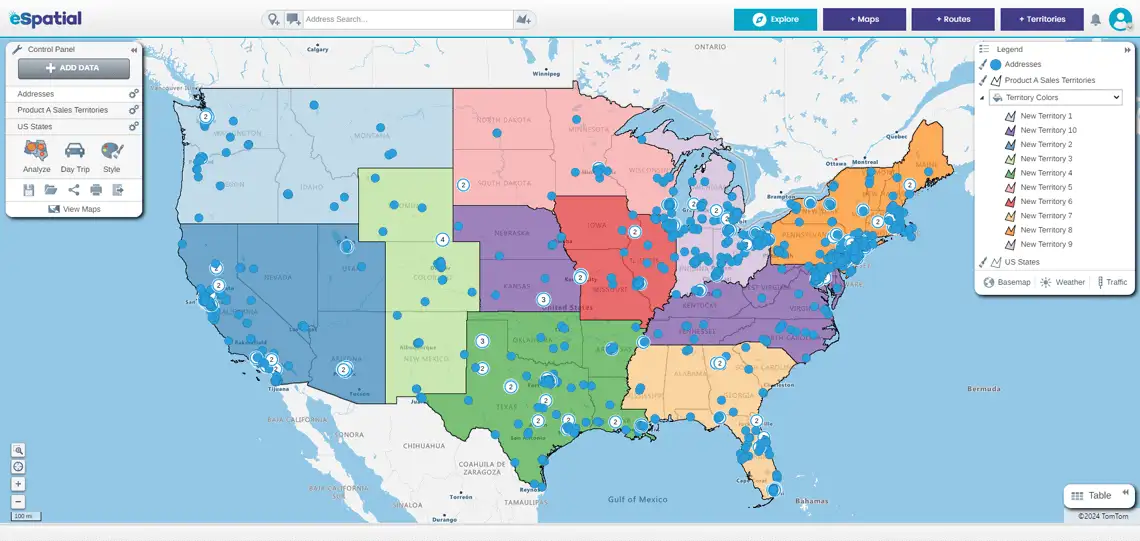
eSpatial: Structured Territory Design
eSpatial offers strong territory balancing and demographic overlays, making it useful for structured planning exercises.
Routing flexibility, real-time adaptability, and integrated analytics are more limited, which can slow execution once plans move into the field.
Best for: Sales ops teams focused on periodic territory realignment.
Salesforce-Native Mapping Tools (Geopointe, Salesforce Maps)CRM-native tools offer convenience for Salesforce-centric teams and reduce data syncing concerns.
The tradeoff is flexibility. These platforms inherit CRM constraints, add-on pricing, and complexity that can slow adoption and limit scalability outside Salesforce workflows.
Best for: Salesforce-only teams that want mapping inside the CRM environment.
Lightweight Tools (ZeeMaps, BatchGeo, Google Maps)
These tools provide quick visualization and are often free or low-cost.
They lack territory intelligence, routing sophistication, and analytics depth, making them suitable only for basic mapping needs or early experimentation.
Best for: Very small teams or one-off visualization needs.

