


Close
WE'RE ALL ABOUT
YOUR
SUCCESS
HOW WOULD YOU LIKE TO GET IN TOUCH:
Email
Calendar
Close
READY FOR MAPLINE TO
ROCK
YOUR WORLD?
Our team is ready to help you eliminate wasted time, maximize your sales coverage, and supercharge your team's efficiency. We'll provide the expert guidance and tailored solutions you need to get things right.
Stop missing out on valuable opportunities. Reach out, and we'll get started on optimizing your territories today!
Email
Calendar
Close
READY FOR MAPLINE TO
ROCK
YOUR WORLD?
WE WANT YOU TO EXPERIENCE EVERY-THING YOU'VE BEEN MISSING BY STARTING YOUR FREE TRIAL TODAY! OUR TEAM IS READY TO HELP CHANGE YOUR LIFE. SO REACH OUT AND WE'LL GET THINGS STARTED!
Email
Calendar
Close
READY FOR MAPLINE TO
ROCK
YOUR WORLD?
Discover the potential of Mapline with a LIVE DEMO from our experts. This is your chance to see it in real-time and get all your questions answered. Connect with us to schedule your demo today!
Email
Calendar
Close
Give us a call. We'd love to talk!

+1 800.969.1454

Close
Give us a call. We'd love to talk!

+1.888.670.3795

Close
Close
Geo Mapping Starter Close

Experience the power

Get ready to see your data in a whole new way!
Geo BI Trial Close

Experience the power

Get ready to see your data in a whole new way!
Your 7-day free trial awaits!
Geo Routing Trial Close

Experience the power

Get ready to see your data in a whole new way!
Your 7-day free trial awaits!
Geo Scheduling Trial Close

Experience the power

Get ready to see your data in a whole new way!
Your 7-day free trial awaits!
Close
Close
Create a Custom
Map  With  Pins
to Visualize Team Activity
Create a Custom
Map With Pins
to Visualize Team Activity

Keeping track of your team’s activity across multiple locations can feel like a game of digital whack-a-mole—especially if your data lives in spreadsheets, CRMs, or scattered messages. What if you could drop a pin for every site visit, rep location, or client stop and see it all in one view? With Mapline, you can create a custom map with pins in minutes—giving you and your team a dynamic, real-time view of performance and presence across regions.

Whether you’re managing a mobile salesforce, coordinating service teams, or tracking store visits, pin mapping helps you visualize who’s doing what—and where. With Mapline’s intuitive tools, you can map team activity, monitor trends, and collaborate with clarity. This article shows you how custom pin maps improve team visibility, streamline communication, and drive smarter decisions across your entire operation.

Why Pin Mapping Is a Game Changer for Team Visibility

When your team operates across cities, regions, or territories, it’s hard to know who’s active where. Spreadsheets and CRM reports lack geographic context, and real-time tracking tools are often too complex or expensive. That’s where a custom location map with pins comes in. It gives you a visual layer on top of your team’s data—bringing clarity, speed, and alignment to day-to-day management.

Whether you need to track team locations on map or plot daily activity, pin mapping helps you see patterns that would otherwise stay buried. You’ll know who’s visiting which clients, how evenly coverage is distributed, and where follow-up may be needed. It turns data into action and helps managers stay proactive—not reactive.

create a custom map with pins
magnifying glass with a checkmark inside

Pro Tip: Want to see exactly where your team is winning—and where they’re falling behind? Use Mapline’s Pin Mapping Software to create live, interactive maps that help your entire team visualize, track, and improve their activity in the field.

Create a Dynamic Map With Pins in Minutes

You don’t need a GIS background to build powerful team maps. With Mapline, you can create a custom map with pins by simply uploading a spreadsheet. Add columns for names, addresses, roles, or status—and Mapline will generate a fully interactive map. You can customize pin colors, group by region, or filter by rep activity to focus on what matters most.

This process works for customer visits, deliveries, technician assignments, or any other team data. It’s a lightweight, scalable solution that’s just as useful for small startups as it is for enterprise field teams. And with Mapline’s cloud-based access, your team can update and share maps in real time—no software install required.

Map Multiple Addresses in One View

Stop flipping between tabs or cross-referencing addresses manually. With Mapline, you can import hundreds or thousands of records and map multiple addresses instantly. Whether it’s reps, accounts, or job sites, you get a clear visual of your operational footprint. Pin maps help identify coverage gaps, regional clusters, and missed opportunities. Everything your team needs to act fast is now in one place.

Customize Pins to Show Key Details

Each pin on your map can carry more than just a location. Add custom data fields like rep name, activity status, last visit date, or next steps. These pin details appear in hover windows or can be clicked for deeper insights. Customization makes your dynamic pin map not only visually appealing—but deeply informative. It’s like turning a static map into a live dashboard.

Market Research Mapping

Use Color and Grouping to Enhance Insights

Color-coded pins make it easy to compare teams, regions, or visit types at a glance. You can group pins by rep, department, or customer tier, then filter the map to isolate specific segments. These visual cues help you spot trends, workload imbalances, or missed check-ins in seconds. The more intuitive your map, the faster your team can respond and execute.

Mapline Data lightbox, with PROVIDE TOTAL VALUE FOR GROUP highlighted

Track and Visualize Team Performance by Location

Pin maps don’t just show where your team has been—they reveal how your team is performing. Mapline lets you overlay metrics like visit frequency, deal volume, or service success onto your pins to visualize team performance. This helps you connect field activity to business outcomes and hold the team accountable in a clear, fair way.

Whether you’re a sales manager looking to boost close rates or a service director aiming for faster response times, pin maps help tie every outcome back to the ground-level activity that caused it. That’s where real insight—and improvement—begins.

Measure Activity Across Territories or Reps

Mapline lets you filter pin activity by rep, date range, or territory, making it easy to compare performance across your team. You can evaluate workload distribution, frequency of visits, or engagement levels by geography. This visibility ensures no one is overloaded or underutilized, and it opens the door to smarter territory assignments. Better analysis means better team outcomes.
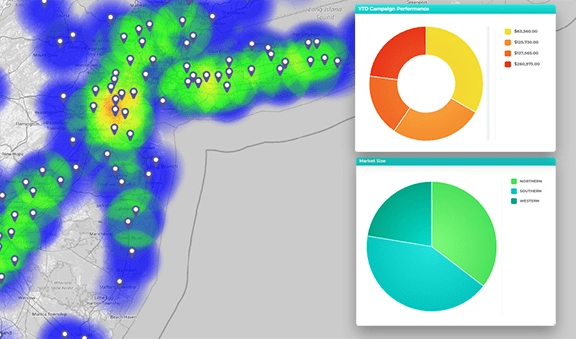
Pinpoint effective marketing areas

Share Maps to Improve Accountability and Coaching

When reps can see their own pins—or a shared view of team activity—they’re more likely to stay on top of their tasks. Managers can use the map as a conversation starter in 1:1s, helping reps reflect on their patterns and uncover improvement opportunities. Shared maps also reduce back-and-forth reporting, freeing up time for action instead of status updates.

Spot Gaps in Follow-Up and Customer Coverage

By looking at recent pin activity—or the lack of it—you can quickly identify areas that need attention. Maybe a high-value customer hasn’t been visited in weeks, or a certain region has dropped off the radar. With Mapline, you can surface these issues in real time and make adjustments immediately. Nothing falls through the cracks when the data is visual and live.

Visualize coverage areas

Collaborate in Real Time With Map-Based Team Views

Pin maps aren’t just for managers—they’re a powerful collaborative team mapping tool. With shared access, reps can view and update their own pins, coordinate with teammates, or tag notes directly on the map. Everyone sees the same version of the truth, which streamlines communication and prevents overlap or confusion in the field.

This is especially useful for teams with rotating schedules, regional handoffs, or cross-functional collaboration. With a single, visual source of truth, teams work faster and more strategically—because everyone knows where the action is happening and where they’re needed next.

Give Reps Access to Their Own Territory Pins

Each team member can view or filter the map to see only the pins relevant to them. This helps reps focus on their own priorities while still staying aligned with team objectives. It also prevents confusion over who’s covering what and supports territory clarity. Reps become more autonomous, accountable, and aligned with strategic goals.

Mapline heat map and mobile navigation

Update Pin Status or Notes on the Fly

Reps and managers can update pin status—like “visited,” “follow-up needed,” or “closed”—directly in the map interface. They can also leave notes, attach links, or record action items for the next visit. This turns your pin mapping software into a working collaboration board that reflects the reality of your operations—not just what’s in a report.

Digitally capture new leads on the go

Filter Live Maps to Prioritize Team Efforts

Use dynamic filters to view only what matters now—whether it’s urgent accounts, overdue check-ins, or high-potential leads. This lets managers focus on solving immediate issues and reps focus on their highest-value tasks. It’s real-time prioritization built into the map, driving better use of time across the team.

How do I create a custom map with pins using Mapline?

Just upload your spreadsheet with addresses or coordinates, and Mapline will automatically plot the pins. You can customize colors, groupings, and filters from there.

Can I use this to map multiple addresses at once?

Yes. You can upload a list of hundreds or thousands of addresses and Mapline will display them all on one map—no manual entry needed.

Is Mapline’s pin mapping tool free?

Mapline offers a free plan that supports basic pin mapping and location visualization. For more advanced filtering and collaboration features, paid plans are available.

Can team members collaborate on the same map?

Absolutely. You can share maps with teammates, assign view/edit permissions, and collaborate in real time on updates or performance tracking.

What types of data can I add to my pins?

Pins can include rep names, visit status, contact info, performance metrics, and more. You can customize the fields to match your workflows.

How does pin mapping help with team performance?

It makes activity visible, measurable, and shareable—so teams stay aligned, accountable, and focused on what drives results.

VISUALIZE TEAM ACTIVITY AND PERFORMANCE WITH A CUSTOM PIN MAP